Leopard Dream: A Playful Pastel Typeface for Creative Projects
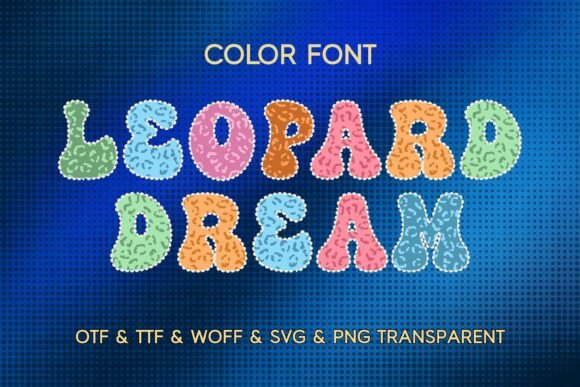
When you first encounter Leopard Dream, it’s less like seeing a font and more like meeting a character. It immediately brings to mind soft, fluffy textures and the kind of cheerful energy you find in a child’s playroom. As a color font—specifically an OpenType-SVG—this typeface renders images directly into the letterforms. You aren't just getting vector outlines; you are getting high-resolution, textured graphics that include the pastel leopard spots and the soft, 3D-like fur edges right inside the glyph. This distinction is vital for modern designers because it changes how we approach layering and file management. Usually, creating a textured letter involves a clipping mask in Illustrator or a knockout effect in Photoshop. Leopard Dream eliminates that step, giving you the finished aesthetic instantly.
Visually, the font is a masterclass in "cute" without being childish. The color palette relies on soft pinks, creams, and gentle mints, avoiding harsh neon contrasts. This makes it surprisingly versatile for sophisticated children’s branding or "kawaii" aesthetics. However, because it is a display font, it demands attention. It is not a workhorse for body text; it is the star of the show. The visual weight of the letters is substantial due to the "fluffy" outline, meaning it holds its own against busy backgrounds better than a thin serif font or a delicate script font might. It creates an immediate focal point, which is exactly what you need from a premium font asset like this.
Practical Applications: Where This Typeface Shines
The utility of a creative font like Leopard Dream extends far beyond simple headers. For small business owners and entrepreneurs in the crafting space, this font is a heavy hitter. If you are designing for Cricut or Silhouette users, this font solves a common problem: creating complex, multi-layered designs without the headache of manual weeding. Because the spots and colors are embedded in the font file, the output is consistent every time.
Consider these specific use cases where Leopard Dream adds significant value:
- Nursery Decor and Wall Art: The soft pastel palette makes it ideal for printing quotes or names for children's rooms. It pairs beautifully with soft background textures like watercolor washes or linen paper.
- Packaging Design: For brands selling children’s clothing, toys, or sweet treats, this font adds a tactile, high-end feel to packaging. It suggests that the product inside is fun and carefully curated.
- Digital Assets and Stickers: In the digital planning community, "cute" sells. This font is perfect for creating planner stickers, social media overlays, and Instagram Story highlights that pop off the screen.
- Merchandise: For t-shirts, tote bags, and mugs, the font works exceptionally well because it is self-contained. You don't need to worry about color separation; what you see in the preview is what prints on the fabric.
From a brand identity perspective, using Leopard Dream signals that a brand is approachable, playful, and current. It taps into the "kidult" trend—adults embracing playful, colorful aesthetics in their daily lives. However, it is strictly a display typeface. Trying to write a paragraph in this font would be illegible and overwhelming. It is meant for short bursts of text: headlines, logos, and call-to-action buttons.
Technical Realities and File Management
As a design professional, you must understand the technical constraints of OpenType-SVG fonts to avoid production errors. The product description notes that the OTF and TTF files are not compatible with Cricut Design Space natively. This is a crucial detail for your workflow. While the font installs on your computer just fine, Cricut's software has historically struggled to render the complex color data inside standard font formats.
Therefore, if you are designing for a client who uses a Cricut machine, or if you are selling cut files, you must utilize the provided SVG and high-resolution PNG files. This is actually a benefit for production consistency. By using the pre-made letter SVGs, you guarantee that the "fluffy" outline remains crisp and the pastel colors stay true to the original design. You avoid the risk of the software rasterizing the font incorrectly during the cutting process.
For those working in Adobe Photoshop, Illustrator, or Affinity Designer, the font works seamlessly. In Photoshop, you simply select the font from the dropdown menu, and the color data appears on your canvas. This allows for rapid prototyping. You can type out a headline for a birthday invitation, check the kerning, and export without ever needing to flatten layers or apply complex blending options. It streamlines the design phase significantly, which is a tangible time-saver for freelancers juggling multiple projects.
Strategic Pairing and Visual Hierarchy
One of the most common mistakes with novelty display fonts is pairing them with the wrong companion typeface. Leopard Dream is visually loud, textured, and colorful. If you pair it with a complex script font or another decorative display font, the result will be visual chaos. The design principle of contrast is your best friend here.
To maintain readability and professionalism, pair Leopard Dream with a clean, geometric sans-serif font. Think of typefaces like Montserrat, Roboto, or Poppins. These fonts have simple shapes and even stroke widths that recede into the background, allowing the playful leopard texture to take center stage. For example, in a poster design, use Leopard Dream for the main event title (e.g., "Wild One") and a clean sans-serif for the details (date, time, location). This creates a clear visual hierarchy that guides the viewer's eye from the fun headline to the necessary information.
Additionally, consider the spacing. Because the "fluffy" outline adds visual bulk to the letters, you may need to adjust the tracking (letter-spacing) slightly more than you would with a standard vector font. Giving the letters room to breathe prevents the textured edges from merging into a muddy blob, ensuring that the leopard pattern remains distinct and recognizable at various sizes.
Evaluating Fit and Licensing
Before integrating Leopard Dream into a commercial project, always review the licensing terms. Most premium fonts have specific clauses regarding print-on-demand (POD) services. Since this font includes high-resolution PNG and SVG assets, it is clearly designed with makers in mind, but "commercial use" can vary by vendor. Ensure your license covers the volume of sales you anticipate.
Finally, evaluate if the font fits the tone of the project, not just the subject matter. While it is perfect for a child’s birthday party, it would likely be inappropriate for a serious corporate report or a luxury jewelry brand. The personality of this typeface is unapologetically sweet and playful. When used in the right context, it elevates the design from generic to memorable. It turns a simple sticker into a piece of art and a basic invitation into a keepsake. By respecting its personality and understanding its technical capabilities, you can leverage Leopard Dream to create designs that are not only beautiful but also production-ready.